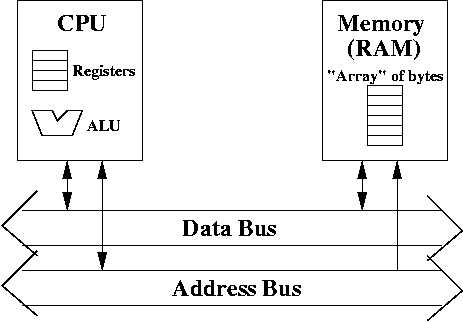
We want to create a computer that is as simple as possible, so that it's easy to understand.
In particular, our computer consists of a CPU, memory, and a bus to connect the two.
The CPU contains a handful of registers (usually, no more than 100, and sometimes as little as 4, depending on the kind of CPU), which acts like local variables. The CPU runs instructions and performs computations, mostly by the ALU (arithmetic-logic unit). However, there's very little memory on the CPU itself (we'll ignore cache for now). The registers are the only memory the CPU has. Register memory is very fast for the CPU to access, since it resides on the CPU itself.
In addition to the CPU is memory (more specifically, RAM). Memory is basically a large array of bytes. Memory stores data, instructions (i.e., programs) and garbage (i.e., not every memory location stores useful information). The CPU can read or write to the memory, but it's much slower than accessing registers. Nevertheless, you need memory because registers simply hold too little information.
However, I don't like the idea of referring to the CPU as a brain because it brings up all sorts of issues related to artificial intelligence. Are computers intelligent? What defines intelligence? Does a CPU model a human brain?
I prefer to think of a computer as simple a device that computes. Computers run instructions. Instructions are low-level commands like add, subtract, or compare two numbers, and run some instruction if the comparison is true, and run some other instruction if it's false.
Instructions are, in general, very simple. By the time a CPU is processing an instruction, it is in binary format. That is, the instruction is encoded in 0's and 1's.
However, the CPU has rather limited memory (if we ignore cache). All the local memory it uses is in registers. It has very fast access to registers, which are on-board the CPU. It has much slower access to RAM.
The bulk of the memory is stored in a separate device called RAM (often called physical memory). RAM stores programs as well as data. In essence, the CPU fetches an instruction in RAM (to a register), determines what instruction it has, and executes the instruction.
Executing the instruction may require loading data from RAM to the CPU or storing data from the CPU to RAM.
Most memory is byte-addressable, meaning that each address refers to one byte of memory.
For example, to fetch an instruction, the CPU writes the address of the instruction in RAM on the address bus. It then sends a control signal to RAM alerting it that it wants to read from the RAM.
The RAM responds to the signal by reading the address from the address bus, then writing the contents of memory at that address on the data bus. The contents of memory at that address is an instruction. The RAM then sends a signal back to the CPU alerting the CPU that it has placed valid data on the data bus.
The CPU then fetches the instruction off the data bus, and places it into a register. It can then begin excuting the instruction it has just read. This may involve loading or storing data in RAM.
Notice that fetching data and fetching instructions is identical. The only difference is where in memory the data is located and where in memory the instructions are located.
I/O devices often run on their own bus, and that bus is connected to the main bus.
With many devices on a bus, there's a problem. Only one device should write to the bus at any one time (see class notes on bus). There may need to be a device which arbitrates which device can write to the bus at any given time.
Also, if you've ever bought memory, you know that it's physically quite large compare to the CPU. The CPU is usually squarish, perhaps as much as 2 inches, or maybe 5 cm, to a side, while memory comes in a card that's perhaps 8 inches wide (20 cm).
In any case, the CPU is almost always a separate device from memory, and so we model a computer where the CPU and memory are different.
There's also a big difference in performance. The CPU almost always operates much, must faster than memory. Accessing memory from RAM is usually about several hundred times slower than accessing memory from registers.
Thus, memory is often the bottleneck in performance. The real problem is that memory speeds have not kept up with processor speeds. Processors have been increasing in speed at a faster pace than RAM. Still, with the use of cache (which is fast, small memory), such speed problems are allieviated to some degree.